


Cisco Meraki Z4
Elegantly designed secure remote work gateway with integrated Wi-Fi 6
Flawless office-like connectivity and enterprise-level security.

Cisco Meraki Products
Cloud Managed Gateway
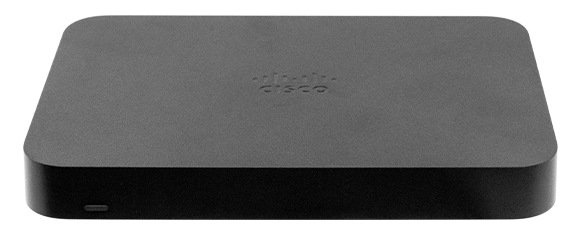
Cisco Meraki Z4 Cloud-Managed Teleworker Gateway
Important Licensing Information: To activate and manage your Cisco Meraki Teleworker Gateway, a purchase of a Cisco Meraki license is mandatory.
Important Licensing Information: To activate and manage your Cisco Meraki Teleworker Gateway, a purchase of a Cisco Meraki license is mandatory.
#Z4-HW
List Price:$1,126.59
Our Price: $540.77
List Price:
Our Price: $540.77
Cisco Meraki Enterprise License and Renewal License
Cisco Meraki Z4 Enterprise License and Support, 1 Year
#LIC-Z4-ENT-1Y
List Price:$200.70
Our Price: $113.80
List Price:
Our Price: $113.80
Cisco Meraki Z4 Enterprise License and Support, 3 Years
#LIC-Z4-ENT-3Y
List Price:$451.58
Our Price: $256.04
List Price:
Our Price: $256.04
Cisco Meraki Z4 Enterprise License and Support, 5 Years
#LIC-Z4-ENT-5Y
List Price:$752.63
Our Price: $426.73
List Price:
Our Price: $426.73
Cisco Meraki Z4 Enterprise License and Support, 7 Years
#LIC-Z4-ENT-7Y
List Price:$1,053.68
Our Price: $597.44
List Price:
Our Price: $597.44
Cisco Meraki Z4 Enterprise License and Support, 10 Years
#LIC-Z4-ENT-10Y
List Price:$1,505.25
Our Price: $853.48
List Price:
Our Price: $853.48
Click here to jump to more pricing!
Overview:
The Cisco Meraki Z4 teleworker gateway is an enterprise class firewall, VPN gateway and router. This device offers wireless connectivity with WiFi6, five gigabit ethernet ports, including a built-in PoE-enabled port for VoIP phones and other PoE powered devices. The Z4 is designed to securely extend the power of Meraki cloud managed networking to almost any location.
Beyond best-effort remote work
- Build the most efficient and scalable long-term remote work strategy
- Secure internet access with Cisco AMP, ThreatGrid, and content filtering
- WAN: 1 GbE; LAN: 4 GbE (1x PoE-enabled port); Wi-Fi: dual-band 2x2 Wi-Fi 6
- LAN: 4 GbE (1x PoE-enabled port); Wi-Fi: dual-band 2x2 Wi-Fi 6
- 500 Mbps firewall throughput
- 250 Mbps site-to-site VPN throughput
Configure your Dashboard Network
The following is a brief overview only of the steps required to add an Z4 to your network. For detailed instructions, please Contact Us.
- Login to http://dashboard.meraki.com. If this is your first time, create a new account.
- Find the network to which you plan to add your Z4 or create a new network.
- Add your Z4 to your network. You will need your Meraki order number (found on your invoice) or the serial number of each Z4, which looks like Qxxx-xxxx-xxxx, and is found on the bottom of the unit. If a license key was purchased at the same time then you should have received it via email.
- Go to the map / floor plan view and place each Z4 on the map by clicking and dragging it to the location where you plan to mount it.
Pricing Notes:
- Pricing and product availability subject to change without notice.
Cisco Meraki Products
Cloud Managed Gateway
Cisco Meraki Z4 Cloud-Managed Teleworker Gateway
Important Licensing Information: To activate and manage your Cisco Meraki Teleworker Gateway, a purchase of a Cisco Meraki license is mandatory.
Important Licensing Information: To activate and manage your Cisco Meraki Teleworker Gateway, a purchase of a Cisco Meraki license is mandatory.
#Z4-HW
List Price:$1,126.59
Our Price: $540.77
List Price:
Our Price: $540.77
Cisco Meraki Enterprise License and Renewal License
Cisco Meraki Z4 Enterprise License and Support, 1 Year
#LIC-Z4-ENT-1Y
List Price:$200.70
Our Price: $113.80
List Price:
Our Price: $113.80
Cisco Meraki Z4 Enterprise License and Support, 3 Years
#LIC-Z4-ENT-3Y
List Price:$451.58
Our Price: $256.04
List Price:
Our Price: $256.04
Cisco Meraki Z4 Enterprise License and Support, 5 Years
#LIC-Z4-ENT-5Y
List Price:$752.63
Our Price: $426.73
List Price:
Our Price: $426.73
Cisco Meraki Z4 Enterprise License and Support, 7 Years
#LIC-Z4-ENT-7Y
List Price:$1,053.68
Our Price: $597.44
List Price:
Our Price: $597.44
Cisco Meraki Z4 Enterprise License and Support, 10 Years
#LIC-Z4-ENT-10Y
List Price:$1,505.25
Our Price: $853.48
List Price:
Our Price: $853.48
Cisco Meraki Security License and Renewal License
Cisco Meraki Z4 Security License and Support, 1 Year
#LIC-Z4-SEC-1Y
List Price:$423.70
Our Price: $240.23
List Price:
Our Price: $240.23
Cisco Meraki Z4 Security License and Support, 3 Years
#LIC-Z4-SEC-3Y
List Price:$953.33
Our Price: $540.54
List Price:
Our Price: $540.54
Cisco Meraki Z4 Security License and Support, 5 Years
#LIC-Z4-SEC-5Y
List Price:$1,588.87
Our Price: $900.89
List Price:
Our Price: $900.89
Cisco Meraki Z4 Security License and Support, 7 Years
#LIC-Z4-SEC-7Y
List Price:$2,224.43
Our Price: $1,261.25
List Price:
Our Price: $1,261.25
Cisco Meraki Z4 Security License and Support, 10 Years
#LIC-Z4-SEC-10Y
List Price:$3,177.75
Our Price: $2,297.52
List Price:
Our Price: $2,297.52
Cisco Meraki Accessories
Cisco Meraki MX Replacement Power Adapter (Z3 and Z4) (50 Watts AC)
#MA-PWR-50WAC
List Price:$152.73
Our Price: $106.30
List Price:
Our Price: $106.30
Cisco Meraki AC Power Cord for MX and MS (US Plug)
#MA-PWR-CORD-US
List Price:$8.95
Our Price: $6.23
List Price:
Our Price: $6.23