Cisco Secure Client (including AnyConnect)
Secure access is just the beginning
Your teams need hassle-free access to corporate resources and private apps. You need to keep your business safe. Cisco Secure Client makes it happen.

Sorry, this product is no longer available, please contact us for a replacement.
Click here for more options and pricing!
Manage and deploy multiple endpoint security agents
Secure Client harnesses the powerful industry-leading AnyConnect VPN/ZTNA and helps IT and security professionals manage dynamic and scalable endpoint security agents in a unified view.
Comprehensive endpoint security
Reduce your clients and enjoy advanced endpoint protection across control points within Secure Client.
An intelligent VPN that's never off duty
You achieve security compliance, and your users get to connect to your VPN quickly and easily. It's a win-win.
Unified cloud management
See all your security agents on one screen with Secure Client's single-cloud management console.
Greater network visibility
Monitor endpoint application usage and user behavior when coupled with Cisco Secure Network Analytics.
Perfect pairing
Cisco SecureX capabilities
Deploy, update, and manage Cisco Secure endpoint agents with SecureX Device Insights.

Cisco Secure Endpoint module
With advanced endpoint protection across control points, your business is safer from threats, and more resilient.
Cisco Umbrella Roaming module
Cloud-delivered security from Cisco Secure Client protects your users even when they're off the VPN.
Overview:
Cisco Secure Client version 5, previously known as Cisco AnyConnect Secure Mobility Client, is compatible with Windows, macOS, and Linux platforms. Users familiar with the current AnyConnect interface will find the Cisco Secure Client user interface similar, with the main differences being the new branding and updated icons.
Cisco Secure Client vs AnyConnect
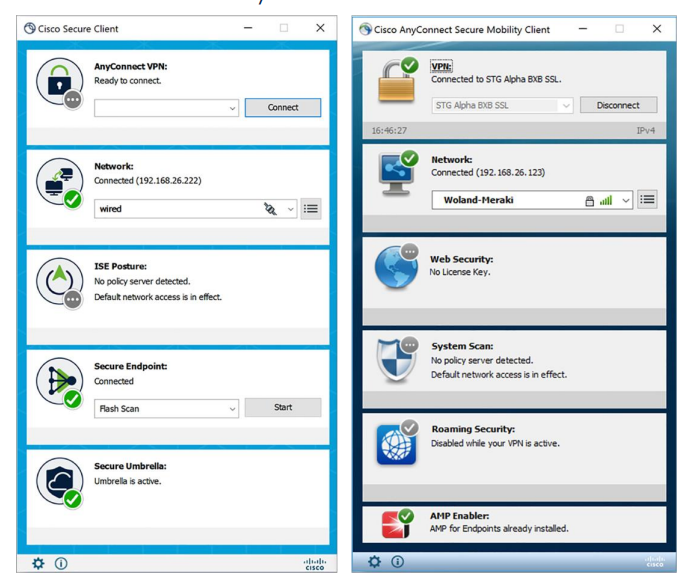
Cisco Secure Client is the rebranded version of one of the most widely deployed security clients. While Cisco AnyConnect is most known as a VPN client, it has evolved significantly over the years. Today, it is more accurately described as a comprehensive security client that offers a suite of security services through its modular approach.
Important to know:
AnyConnect rebranding to Secure Client (including major version increment to 5)
- Introduction of Secure Endpoint within Cisco Secure Client as a fully functioning module
- Software maintenance for 4.x software releases ended on March 31, 2024. Maintenance releases and patches are no longer provided for AnyConnect 4.x, customers should migrate to Cisco Secure Client
- Application software support (AnyConnect 4.x) will not be available for the stated software versions beyond March 31, 2027. Software maintenance and application software support requires an active term license or active service contract for perpetual licenses. After these dates, all support services for the product are unavailable, and the product becomes obsolete. Migration path is Cisco Secure Client 5
- Cloud deployment and management of Cisco Secure Client 5 and later versions available standalone in Cisco Secure Client Cloud Management or via Cisco XDR
Note: Customers have the flexibility to continue using their existing deployment methods, including options like Cisco Secure Firewall ASA, Cisco Firepower (NGFW) , ISE, MDM/EMM, or software management tools such as SCCM. Alternatively, they can also choose to deploy using the MSI installer directly.
Screens and tools for Cloud Management including:
- Capability to customize and generate a network installer for Secure Client
- Option to create, upload, and download custom profiles for Secure Client
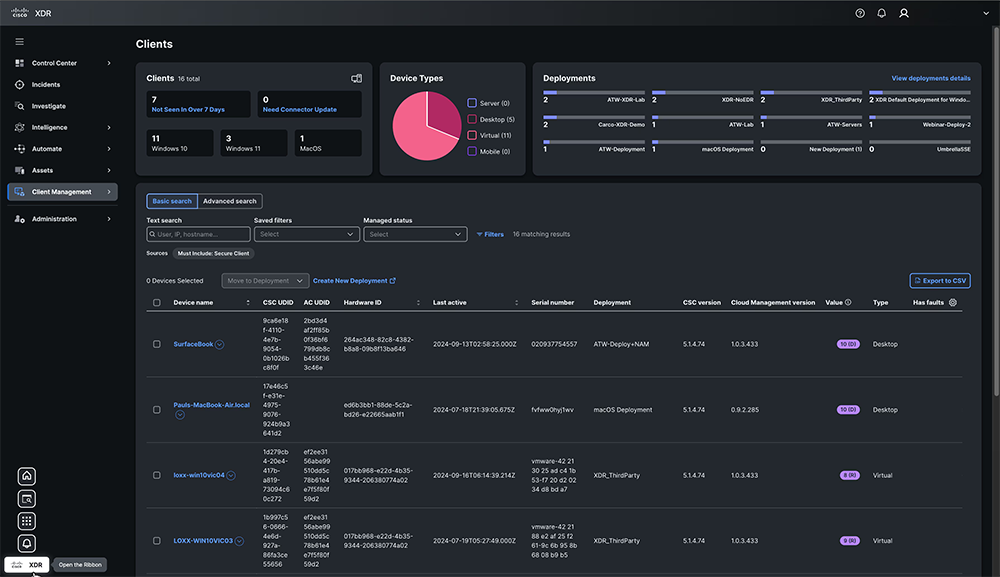
- Leverage the visibility provided by the Client Inventory for clients deployed via the cloud
- Available in XDR: The Client Management feature with Secure Client is the next-generation Secure Mobility Client, integrating the functionalities of both AnyConnect and Secure Endpoint with a Cloud Management solution into a single, unified end-user interface
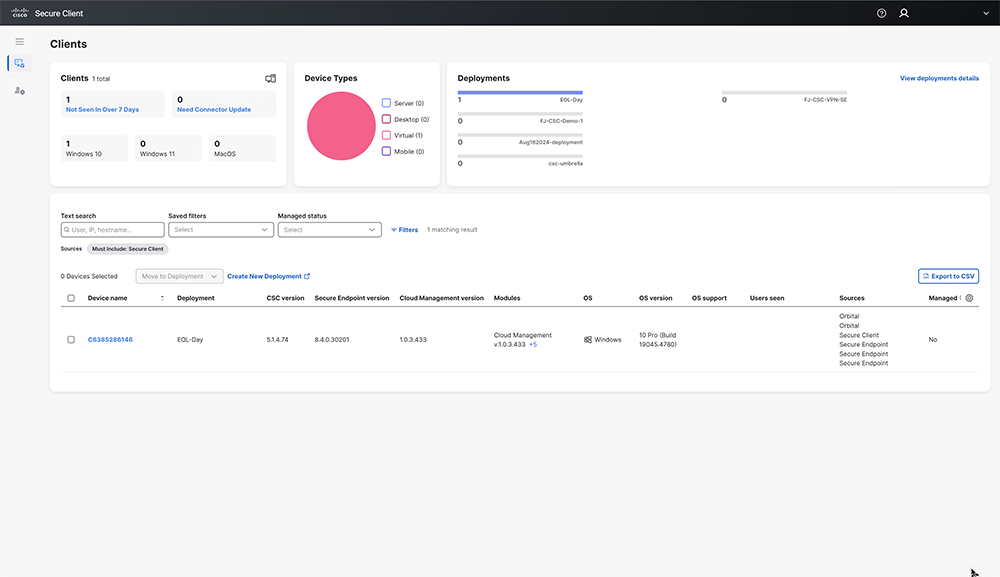
- Available in a Stand-alone interface: Cisco Secure Client Cloud Management is the next-generation Secure Mobility Client, merging the capabilities of both AnyConnect and Secure Endpoint with a Cloud Management solution into a single, unified end-user interface
Modules and Features:
AnyConnect VPN/ZTNA User and Management Tunnels
Cisco Secure Client offers various options for automatically connecting, reconnecting, or disconnecting VPN sessions. These options make it convenient for users to connect to your VPN while supporting your network security needs. An always-on intelligent VPN allows AnyConnect client devices to automatically select the best network access point and adapt its tunneling protocol to the most efficient method. This can include the Datagram Transport Layer Security (DTLS) protocol for latency-sensitive traffic.
Tunneling support is also available for IP Security Internet Key Exchange version 2 (IPsec IKEv2). Select application VPN access can be enforced on Apple iOS, Google Android and Samsung Knox with the per-app VPN.
The management VPN tunnel ensures connectivity to the corporate network whenever the client system is powered up, not just when a VPN connection is established by the end user. This feature allows for patch management on out-of-office endpoints, especially devices infrequently connected by users via VPN to the office network. Endpoint OS login scripts requiring corporate network connectivity will also benefit from this feature.
Zero Trust Access module
The Zero Trust Access module is now available for Secure Client deployments 5.1.3.62 or later. Zero Trust Access reduces the attack surface by hiding applications, and expands your level of knowing, understanding, and controlling who and what is on your network.
Cisco Secure Endpoint
With Cisco Secure Client 5, the former AMP for Endpoints client has been unified into Cisco Secure Client, functioning as a full module and leveraging the same user interface as other modules. The Cisco Secure Endpoint Cloud, XDR Client Management, and stand-alone Cisco Secure Client Cloud Management can all deploy Cisco Secure Client with Cisco Secure Endpoint. This integration enables customers to reduce the number of clients they need to manage.
Cloud Management Module
XDR Client Management and stand-alone Cisco Secure Client Cloud Management for Cisco Secure Client 5 and greater enable administrators to create cloud managed deployments of Cisco Secure Client. This deployment configuration offers the option to download a lightweight bootstrapper, containing only the necessary information for the endpoint to connect to the cloud and receive the specified Cisco Secure Client and modules along with their associated profiles. A full installer is also available. In either case, administrators distribute the installers to the endpoints using their preferred software distribution method.
Network Visibility Module
The Network Visibility Module (NVM) provides a continuous stream of high-value endpoint telemetry, enabling organizations to monitor endpoint and user behaviors on their networks. It gathers flow data from endpoints both on- and off-premises, along with essential context such as users, applications, devices, locations, and destinations. This data is cached and sent to the Network Visibility Module Collector when the endpoint is connected to a trusted network (either the corporate network on-premises or via VPN).
The Network Visibility Module Collector is a server that receives Internet Protocol Flow Information Export (IPFIX) data, optionally filters it, and then exports it to Cisco Secure Network Analytics Endpoint License, syslog, or collectors like Splunk for on-premises collection. It processes received messages that adhere to the nvzFlow protocol specification and sends flow information only when on a trusted network. By default, no data is collected; data is collected only when configured in the profile. If collection occurs on an untrusted network, the data is cached and sent once the endpoint connects to a trusted network.
NVM is a core component of Cisco XDR. By installing the XDR Default Deployment on your endpoints, you can send telemetry directly to Cisco XDR without the need for an on-premises collector. Cisco XDR uses this data to create new detections, correlate multiple events into a single incident, and fill visibility gaps in your network.
Umbrella Roaming Security module
The Umbrella Roaming Security module requires a subscription to an Umbrella Roaming Security service, available with the Professional, Insights, Platform, or MSP package. This module provides DNS-layer security when no VPN is active, and a Cisco Umbrella subscription includes Intelligent Proxy. Additionally, Cisco Umbrella subscriptions offer content filtering, multiple policies, robust reporting, Active Directory integration, and more. The same Umbrella Roaming Security module is used regardless of the subscription level.
ISE Posture module
ISE Posture conducts a client-side evaluation. The client receives the posture requirement policy from the headend, gathers the necessary posture data, compares the results against the policy, and sends the assessment results back to the headend. Although ISE ultimately determines the endpoint’s compliance status, it depends on the endpoint’s own evaluation of the policy.
Network Access Manager
Network Access Manager is client software exclusively for Windows that ensures a secure Layer 2 network in line with its policies. It detects and selects the optimal Layer 2 access network and performs device authentication for access to both wired and wireless networks. Network Access Manager handles user and device identity as well as the network access protocols necessary for secure access. It operates intelligently to prevent end users from making connections that violate administrator-defined policies.
Secure Firewall Posture
Secure Firewall Posture, previously known as HostScan, is a package that installs on the remote device after the user connects to the Secure Firewall ASA but before the user logs in. Secure Firewall Posture can include any combination of the basic module, the endpoint assessment module, and the advanced endpoint assessment module. Note that Secure Firewall Posture is not supported on mobile devices such as Android, iOS, ChromeOS, or UWP.
ThousandEyes
The ThousandEyes Endpoint Agent is an application that gathers network and application-layer performance data when users access specific websites from within monitored networks. It enhances customers' ability to gain a comprehensive view of their application health, enabling them to make better-informed decisions and resolve issues more quickly. When ThousandEyes is installed within Secure Client, its version is displayed in the Secure Client About box upon detection. The ThousandEyes agent, as part of Cisco Secure Client, is installed using the pre-deployment method.
| Remote-Access VPN | |
|---|---|
| Feature | Benefits and Details |
| Broad operating system support | Windows 11 (64-bit), current Microsoft supported versions of Windows 10 x86(32-bit) and x64(64-bit), and Windows 8
Microsoft-supported versions of Windows 11 for ARM64-based Microsoft-supported versions of Windows 10 for ARM64-based PCs Note: Initial CISCO SECURE CLIENT5.0 is Windows 10/11 Only. AnyConnect supports all the above. macOS 12, 11.2, 10.15, and 10.14 (all 64-bit) Red Hat Ubuntu SUSE (SLES) See mobile data sheet for Mobile OS support |
| Software access |
|
| Optimized network access: VPN protocol choice SSL (TLS and DTLS); IPsec IKEv2 |
|
| Optimal gateway selection | Determines and establishes connectivity to the optimal network-access point, eliminating the need for end users to determine the nearest location |
| Mobility friendly |
|
| Encryption |
|
| Wide range of deployment options |
|
| Wide range of authentication options | Protocols:
Headend Methods
|
| Consistent user experience |
|
| Centralized policy control and management |
|
| Advanced IP network connectivity |
IP address assignment mechanisms:
|
| Robust unified endpoint compliance |
|
| Client firewall policy |
|
| Localization | In addition to English, the following language translations are included:
|
| Ease of client administration |
|
| Profile editor |
|
| Diagnostics |
|
| Federal Information Processing Standard (FIPS) | FIPS 140-2 level 2 compliant (platform, feature, and version restrictions apply) |
|
Secure Mobility and Network Visibility |
|
|---|---|
| Feature | Benefits and Details |
| Cisco Umbrella Roaming (Cisco Umbrella Roaming license required) |
|
| Network Visibility Module |
|
| Cisco Secure Endpoint (Cisco Secure Endpoints licensed separately) |
|
| ThousandEyes |
|
|
Network Access Manager and 802.1X |
|
|---|---|
| Feature | Benefits and Details |
| Media support |
|
| Network authentication |
|
| Wireless encryption protocols |
|
| Session resumption |
|
| Ethernet encryption |
|
| One connection at a time |
|
| Complex server validation |
|
| EAP-Chaining (EAP-FASTv2) |
|
| Enterprise Connection Enforcement (ECE) |
|
| Next-generation encryption (Suite B) |
|
| Credential types |
|
|
Zero Trust Access (ZTA Module) |
|
|---|---|
| Feature | Benefits and Details |
| Zero Trust Access Module |
|
| ZTNA Support | Currently supported by the Cisco Secure Access solution |
| System Requirements |
|
| Cisco Secure Client | Please refer to the Cisco Secure Client Release Notes for the latest support information |
At-a-Glance:
Investigation and response to cybersecurity incidents should not require more than 20 endpoint tools. Consolidating and simplifying security at the Endpoint is vital, but it becomes increasingly complex with every deployed security tool in your environment. Using multiple solutions can increase the time it takes for incident analysis and security system maintenance, not to mention that the learning curve is tremendous. It would help if you had a solution that takes the burden of managing and monitoring multiple endpoint applications. That’s where Cisco Secure Client steps in.
Features and Benefits
Cisco Secure client is the next generation of AnyConnect. It enhances the modular approach of AnyConnect and introduces Cisco Secure Endpoint as a fully integrated module into the new Cisco Secure Client.
Existing customers will still enjoy a familiar and user-friendly experience. Existing Secure Endpoint (AMP for Endpoints) users will find the end user interface easy to navigate.
We are introducing the ability to deploy, update and manage Cisco Secure Client from the Cloud. This provides customers another deployment option to our long-existing deployment options; Pre-deploy (SCCM, MSI), Web Deploy with VPN Headends, Secure Firewall, and the Identity Services Engine. Cloud Management is an optional feature.
Cloud Management allows for different deployment installers that contain the modules and associated profiles that best fit the groups of users. The software will access the cloud transparently based on an administrative configuration in the CM profile. The user is no longer required to be on-premise either physically or via VPN to be updated.
Benefits For Security Administrators
- Low total cost of ownership from a single client providing multiple services
- Context-aware, comprehensive, and continuous endpoint security
- Extending flexible, policy-driven access to corporate resources across wired, wireless, and VPN.
Benefits For End Users
- Highly secure access across popular PC and mobile devices
- Consistent user experience
- Intelligent, dependable, and always-on connectivity
- Rebranded AnyConnect UI
- Unified Agent
- Cisco Secure Endpoint Module
- Cloud Managed option
- Pathway to Zero Trust Network Access
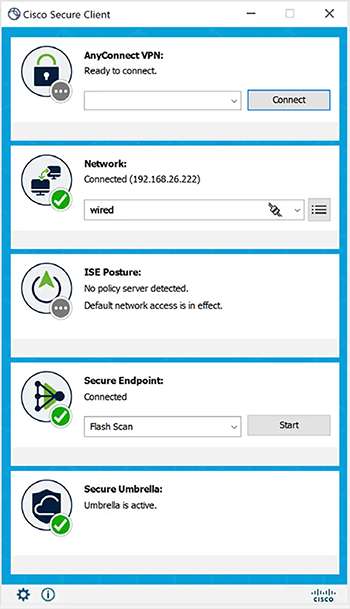
| Features | Description |
|---|---|
| AnyConnect VPN/ ZTNA User | Cisco Secure Client provides many options for automatically connecting, reconnecting, or disconnecting VPN sessions. These options offer a convenient way for your users to connect to your VPN and support your network security requirements. |
| AnyConnect VPN Management Tunnels | Management VPN tunnel provides connectivity to the corporate network whenever the client system is powered up, not just when the end-user establishes a VPN connection. As a result, you can perform patch management on out-of-the-office endpoints, especially devices that are infrequently connected by the user, via VPN, to the office network. |
| Cisco Secure Endpoint Module | Available with Cisco Secure Client for Windows, Secure Endpoint functions as a module within Cisco Secure Client and is accessible via the Cisco Secure Client user interfaces. The Cisco Secure Endpoint Cloud can also deploy Cisco Secure Client with Cisco Secure Endpoint, as can the SecureX Cloud Management. |
| Cloud Management Module | SecureX Cloud Management Deployment for Cisco Secure Client enables Administrators to create cloud-managed deployments of Cisco Secure Client. The deployment configuration generates the option to download a lightweight bootstrapper that contains the information needed by the endpoint to contact the cloud for the specified Cisco Secure Client modules by the deployment with their associated profiles. |
| Network Visibility Module | The Network Visibility Module delivers a continuous feed of high-value endpoint telemetry, which allows organizations to see endpoint and user behaviors on their networks. It collects flow from endpoints on and off-premises and valuable contexts like users, applications, devices, locations, and destinations. It caches this data and sends it to the Network Visibility Module Collector when it is on a trusted network (the corporate network on-prem or through VPN). |
| Umbrella Roaming Security module | To take advantage of Umbrella Roaming Security service, you need the Professional, Insights, Platform, or MSP package subscriptions. Umbrella Roaming Security provides DNS-layer security when no VPN is active and adds an Intelligent Proxy. |
| ISE Posture module | ISE Posture is a module you can choose to install as an additional security component of the Cisco Secure Client product. Perform endpoint posture assessment on any endpoint that fails to satisfy all mandatory requirements and is deemed non-compliant. |
| Network Access Manager | Network Access Manager manages user and device identity and the network access protocols required for secure access. It works intelligently to prevent end-users from making connections that violate administrator-defined policies. |
| Posture (for Secure Firewall) | Secure Firewall Posture performs server-side evaluation where the Secure Firewall asks only for a list of endpoint attributes such as operating system, IP address, registry entries, local certificates, and filenames, and they are returned by Secure Firewall Posture. |
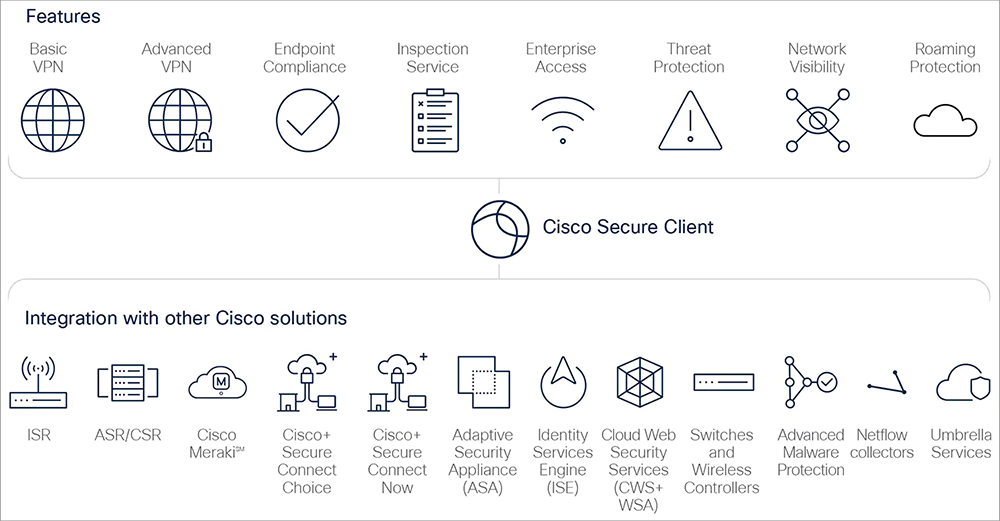
Cisco Secure Client — Way more than VPN:
Licensing Options
Cisco offers the following licensing models for Secure Client:
- Secure Client Advantage License
- Formerly known as AnyConnect Plus.
- Available as a subscription license.
- Provides essential VPN and security features suitable for most business needs.
- Secure Client Premier License
- Formerly known as AnyConnect Apex.
- Available as a subscription license.
- Includes all features of the Advantage License plus additional capabilities such as network visibility, unified endpoint compliance, and advanced encryption standards for organizations with more complex security requirements.
- Secure Client VPN Only – Perpetual License
- Designed for VPN-only environments.
- Licensed based on a single headend device and simultaneous connections, not authorized users.
- Does not support other Secure Client functions or services.
- Secure Client Advantage – Perpetual License
- Provides the same features as the Advantage subscription license but with perpetual usage rights.
User Tier Licensing
Licenses are structured based on the number of unique or authorized users. The available user tiers are:
- 25–99 Users
- 100–249 Users
- 250–499 Users
- 500–999 Users
- 1,000–2,499 Users
- 2,500–4,999 Users
- 5,000–9,999 Users
- 10,000–24,999 Users
- 25,000–49,999 Users
- 50,000–99,999 Users
- 100,000 or more Users
The minimum user license size is 25.
Key Considerations
- Subscription Terms: Subscription licenses are typically offered in 1, 3, or 5-year terms.
- License Stacking: Secure Client Advantage and Premier licenses can be stacked, allowing for flexibility in deployments.
- User Count Determination: Licenses are based on the total number of unique or authorized users, not simultaneous connections.
- VPN Only License Limitations: VPN Only licenses are concurrent endpoint-based and applied per individual ASA. They are not portable and cannot be combined with Plus or Apex licenses.
Documentation:
Download the Cisco Secure Client (including AnyConnect) Datasheet (PDF).
Download the Cisco Secure Client At-a-Glance (PDF).
Pricing Notes:
- Pricing and product availability subject to change without notice.